

API keys
Respan lets you manage spending caps, expiry, and notifications per API key so you can hand keys to teammates or environments without worrying about runaway cost or stale credentials.
Use a separate key for each application and environment. This keeps usage attributable, limits the impact of replacing a credential, and lets you scope features such as data webhooks to the intended traffic.
Create an API key
Go to the API keys page and click Create new key.
- Give the key a name that identifies its owner, application, and purpose.
- Select the environment.
- Configure limits, expiry, and notifications when needed.
- Create the key and copy the secret to your secret manager when it is shown.
Treat an API key like a password. Do not commit it to source control, paste it into screenshots, or expose it in client-side code. If a key may have been exposed, stop using it and replace it with a new key.
Environment
Tag each key as production or development so traffic, logs, and spend stay separated. Use distinct keys per environment instead of toggling an env parameter at request time.
Read the key inventory
The API keys page shows each key’s current status and environment and provides an actions menu for that key. Use the inventory to check that production services use production keys and that only credentials you still expect are active.
Names are operational metadata, not access control. Use a consistent pattern such as production-support-api or development-eval-runner, but do not include the key secret, customer data, or other sensitive values in the name.
Advanced settings
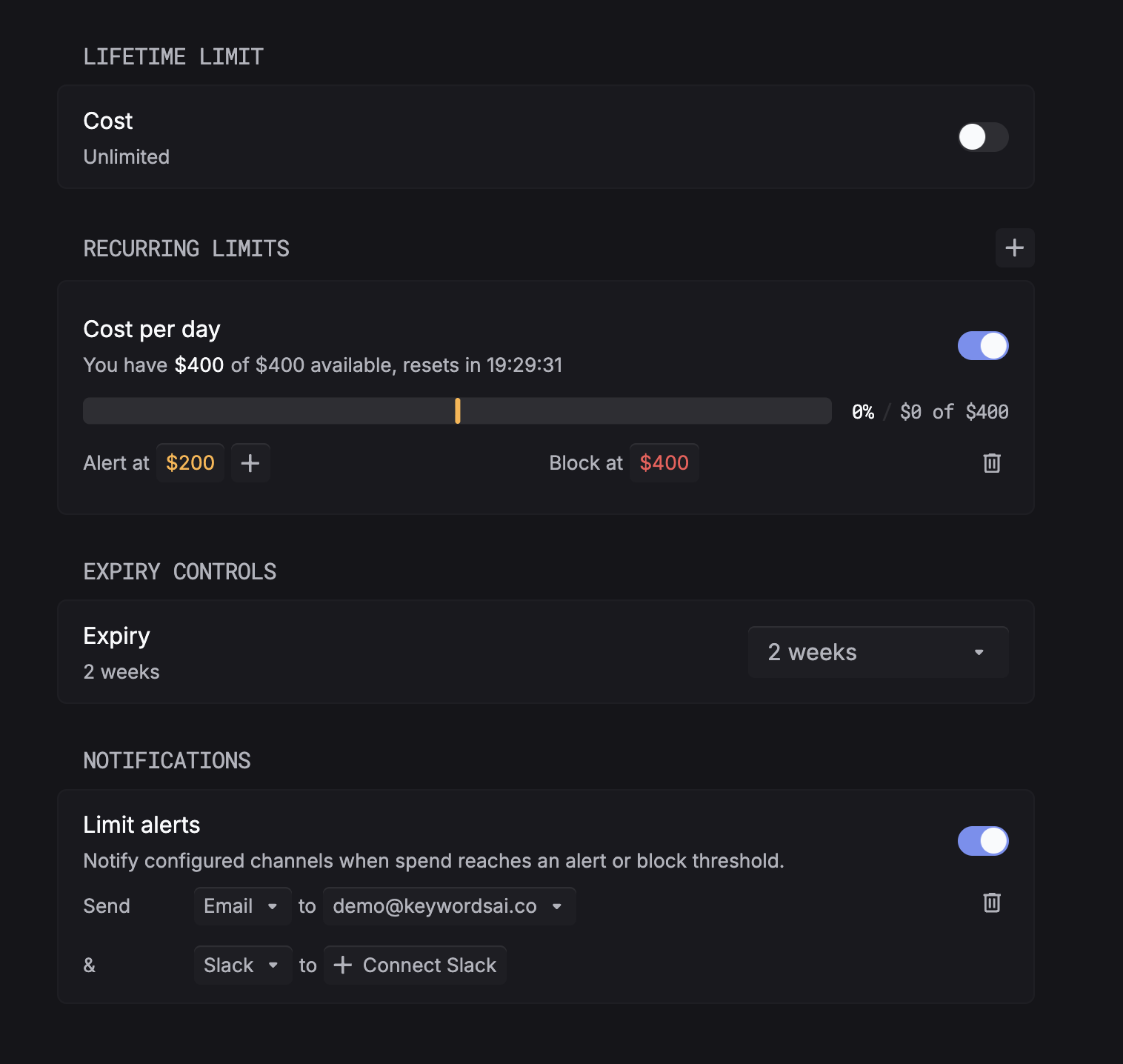
Lifetime limit
Cap total spend over the key’s entire lifetime. Toggle on and set a hard cost ceiling, or leave unlimited.
Recurring limits
Add one or more rolling spend caps (for example, Cost per day). For each cap, set:
- Alert at a soft threshold that sends a notification but lets requests continue.
- Block at a hard threshold that stops the key from making requests until the window resets.
Use the + to stack multiple windows (daily, weekly, monthly) on the same key.
Expiry controls
Set an expiration so a temporary key (demo, contractor, time-boxed project) self-terminates. Common presets like 2 weeks, 30 days, and custom dates are available.
Notifications
Turn on Limit alerts to notify when spend crosses an alert or block threshold. Send to email, Slack, or both. Connect Slack from the dropdown the first time you use it.
Manage keys and limits with the API
Everything above is also available programmatically. POST /api/temporary-keys/ accepts an optional limit_policies array, so you can mint a key and attach its spending, request, or token caps in one call. Manage those caps afterward through the Limit Policies API.
- Create an API key with inline
limit_policies. - Limit Policies API to create, list, update, and delete caps.
Caps are stored and visible as soon as they are created, but the gateway enforces them only where the limit system is enabled for your environment. Confirm enforcement is on before you rely on a cap to block traffic.
Monitor API keys
Track usage and spend per key on the dashboard to understand traffic patterns and catch unexpected charges early.
Replace a key safely
- Create a new key with the intended environment and limits.
- Store it in the service’s secret manager.
- Deploy the service with the new key.
- Confirm new requests appear under the replacement key on the Metrics dashboard or Logs page.
- Only then use the old key’s available actions to disable or remove it.
The key inventory exposes per-key actions, but the exact disable, deletion, and recovery behavior can vary with the current product version and your permissions. Confirm the action in the dialog before applying it to a production key.