

Schedule usage reports
Reports turn selected observability metrics into a recurring digest. Use them when a team needs a scheduled summary; use Metrics dashboards for interactive analysis and Monitors for threshold-based alerts.
Configure the schedule
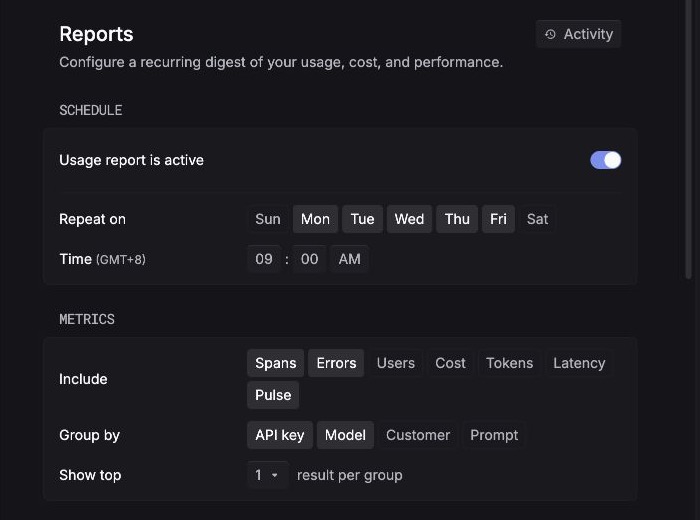
- Turn on Usage report is active when the report is ready to run.
- Under Repeat on, select the weekdays that should receive the digest.
- Set the delivery time shown in the editor. Confirm the timezone displayed beside Time before saving.
Choose the contents
The Include control selects the sections in the report. The current editor offers Spans, Errors, Users, Cost, Tokens, Latency, and Pulse.
Use Group by to break a metric down by API key, Model, Customer, or Prompt. Show top limits the number of results included for each selected group.
Choose the smallest set that answers the recipient’s recurring question. For example:
A report summarizes selected metrics on its schedule. It does not replace a monitor: use a monitor when a threshold crossing should notify responders immediately.
Review activity
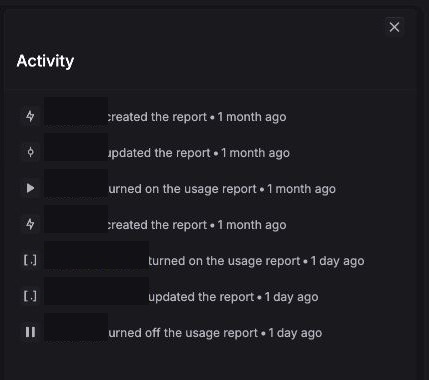
Open Activity to see changes such as creating, updating, turning on, or turning off the usage report. Use this history to confirm that a schedule change was recorded and to understand why delivery behavior changed.
The current editor and activity view do not document delivery retries, missed-run recovery, retention, or recipient permissions. Do not use a scheduled report as the only mechanism for incident paging or compliance delivery.