Advanced
Advanced configuration for the Respan LLM Gateway — models, traffic management, caching, and more.
For the complete list of all request parameters, see Span Attributes and API reference.
Set up Respan
- Sign up — Create an account at platform.respan.ai
- Create an API key — Generate one on the API keys page
- Add credits or a provider key — Add credits on the Credits page or connect your own provider key on the Integrations page
Use AI
Add the Docs MCP to your AI coding tool to get help building with Respan. No API key needed.
Load balancing
Load balancing allows you to balance the request load across different deployments. You can specify weights for each deployment based on their rate limit and your preference.
See all supported params here.
Load balancing between models
Add models
Click Add model to add models and specify the weight for each model and add your own credentials.
Load balancing between deployments
A deployment basically means a credential. If you add an OpenAI API key, you have one deployment. If you add 2 OpenAI API keys, you have 2 deployments.
You can go to the platform and add multiple deployments for the same provider, specifying load balancing weights for each deployment.
You can also load balance between deployments in your codebase using the customer_credentials field:
Specify available models
You can specify the available models for load balancing. For example, if you only want to use gpt-3.5-turbo in an OpenAI deployment, specify it in the available_models field or do it in the platform.
Learn more about how to specify available models in the platform here.
Retries
When an LLM call fails, the system detects the error and retries the request to prevent failovers.
Via UI
Via code
Go to the Retries page and enable retries and set the number of retries and the initial retry time.

Supported parameters
Automatic retry logic
Respan will automatically retry failed requests if the failure is a rate limit issue from the upstream provider:
Fallback models
Respan catches any errors occurring in a request and falls back to the list of models you specified in the fallback_models field. This is useful to avoid downtime and ensure availability.
See all Respan params here.
Via UI
OpenAI Python SDK
OpenAI TypeScript SDK
Standard API
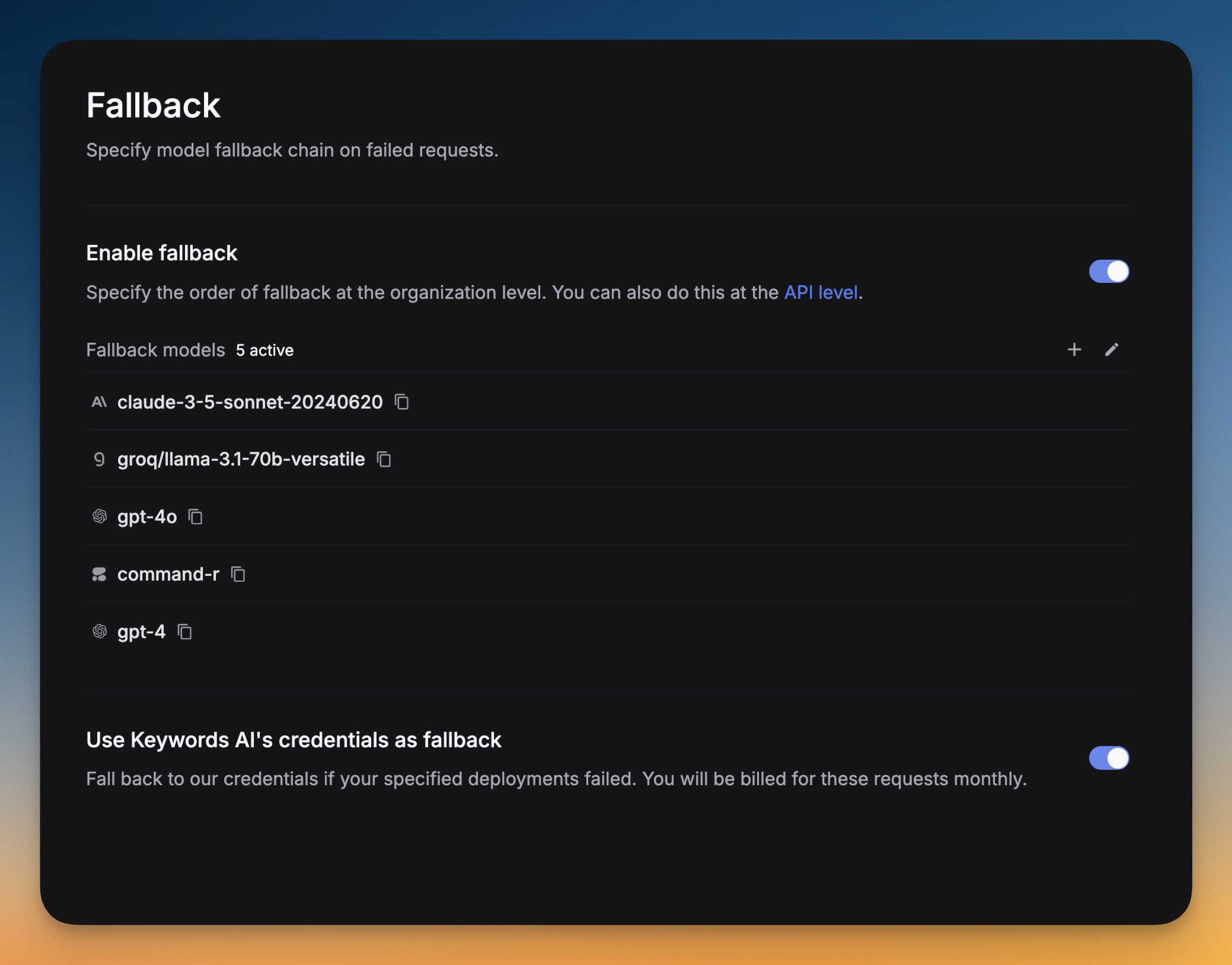
Go to Settings -> Fallback -> Click on Add fallback models -> Select the models you want to add as fallbacks.
You can drag and drop the models to reorder them. The order of the models in the list is the order in which they will be tried.
Rate limit
You can set rate limits for each model and API key. See our rate limit configuration guide for detailed instructions.
Caches
Caches save and reuse exact LLM requests. Enable caches to reduce LLM costs and improve response times.
- Reduce latency: Serve stored responses instantly, eliminating repeated API calls.
- Save costs: Minimize expenses by reusing cached responses.
Turn on caches by setting cache_enabled to true. We will cache the whole conversation, including the system message, user message and the response.
OpenAI Python SDK
OpenAI TypeScript SDK
Standard API
Cache parameters
Enable or disable caches.
Time-to-live (TTL) for the cache in seconds.
Cache behavior options.
View caches
You can view the caches on the Logs page. The model tag will be respan/cache. You can also filter the logs by the Cache hit field.
Omit logs when cache hit
Set the omit_logs parameter to true or go to Caches in Settings. This won’t generate a new LLM log when the cache is hit.
Prompt caching
You can only enable prompt caching if you are using LLM proxy for Anthropic models.
Prompt caching stores the model’s intermediate computation state. This allows the model to generate diverse responses while still saving computational costs, as it doesn’t need to reprocess the entire prompt from scratch.
Anthropic Python SDK
Anthropic TypeScript SDK
Proxy API
How does prompt caching work?
All information is from Anthropic’s documentation.
When you send a request with prompt caching enabled:
- The system checks if a prompt prefix, up to a specified cache breakpoint, is already cached from a recent query.
- If found, it uses the cached version, reducing processing time and costs.
- Otherwise, it processes the full prompt and caches the prefix once the response begins.
This is especially useful for:
- Prompts with many examples
- Large amounts of context or background information
- Repetitive tasks with consistent instructions
- Long multi-turn conversations
The cache has a 5-minute lifetime, refreshed each time the cached content is used.
Pricing for Anthropic models
- Cache write tokens are 25% more expensive than base input tokens
- Cache read tokens are 90% cheaper than base input tokens
- Regular input and output tokens are priced at standard rates
Supported models and limitations
Prompt caching is currently supported on: Claude 3.5 Sonnet, Claude 3.5 Haiku, Claude 3 Haiku, Claude 3 Opus.
Minimum cacheable prompt length:
- 1024 tokens for Claude 3.5 Sonnet and Claude 3 Opus
- 2048 tokens for Claude 3.5 Haiku and Claude 3 Haiku
Shorter prompts cannot be cached, even if marked with cache_control.
Function calling
Function calling allows you to call a function from a model and get the result.
Enable thinking
Thinking mode allows supported models to show their reasoning process before providing the final answer.
Parameters:
- type: Set to
"enabled"to activate thinking mode - budget_tokens: Maximum number of tokens allocated for the thinking process (optional)
Choose models that support thinking like gpt-5, claude-sonnet-4-20250514. See the Log Thinking documentation for details on the response structure.
Upload PDF
To help models understand PDF content, we put into the model’s context both the extracted text and an image of each page.
Upload image
You can upload images to the LLM request. We support base64 or url format for image variables.
OpenAI SDK
Standard API
Disable logging
At Respan, data privacy is our priority. Set the disable_log parameter to true to disable logging for sensitive data.
The following fields will not be logged: full_request, full_response, messages, prompt_messages, completion_message, tools.
See all supported parameters here.
OpenAI Python SDK
OpenAI TypeScript SDK
Standard API
Streaming
When streaming is enabled, Respan forwards the streaming response to your end token by token. This is useful when you want to process the output as soon as it is available, rather than waiting for the entire response.
See all params here.
