1. Sign up — Create an account at platform.respan.ai
  2. Create an API key — Generate one on the API keys page
  3. Add credits or a provider key — Add credits on the Credits page or connect your own provider key on the Integrations page

What is Haystack?

Haystack is a Python framework for building production-ready LLM pipelines with multiple components (retrievers, prompt builders, LLMs). The Respan integration captures your entire workflow execution and can route LLM calls through the Respan gateway.
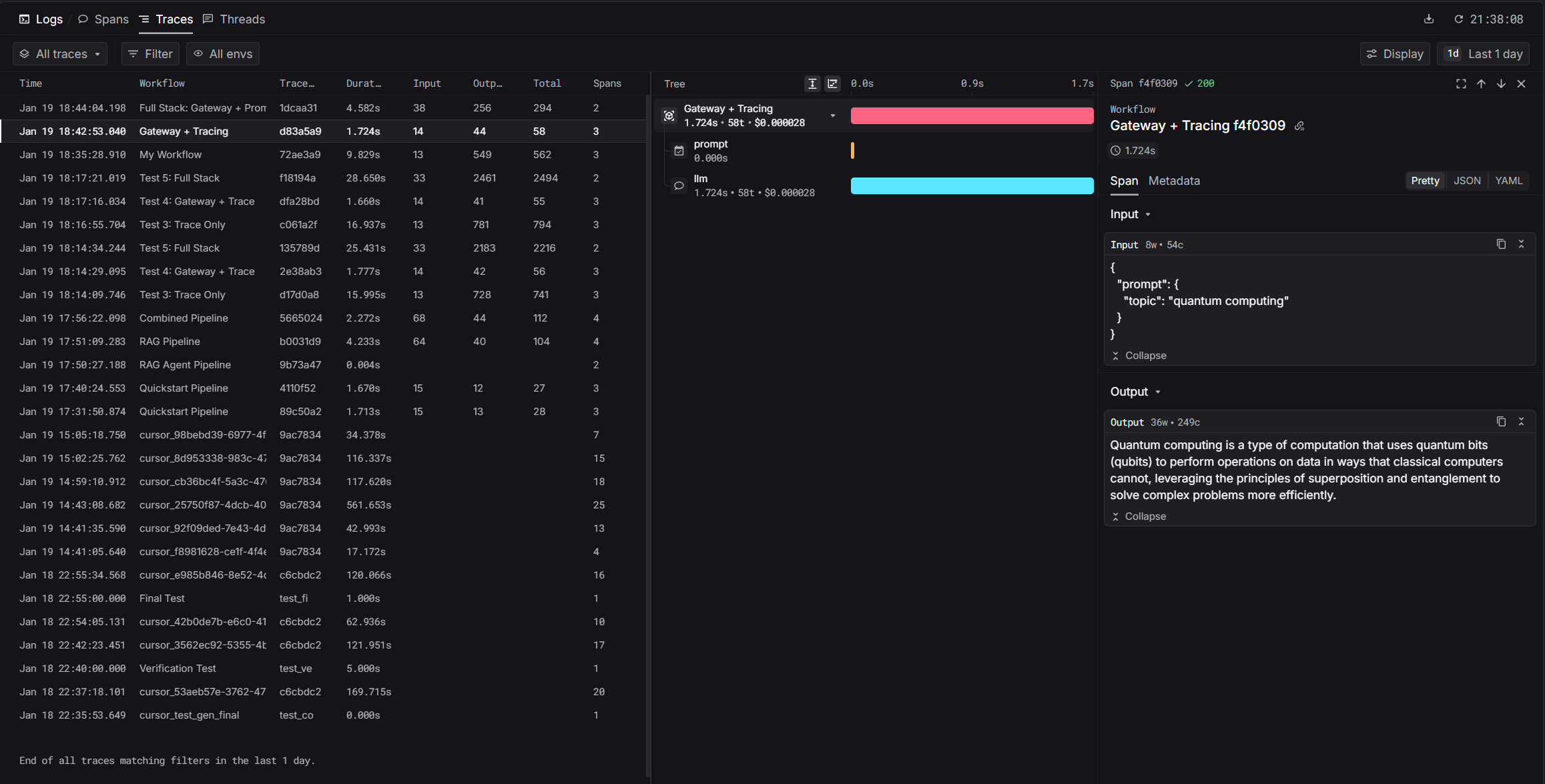
Haystack tracing visualization

Setup

1

Install packages

pip install respan-exporter-haystack
2

Set environment variables

.env
RESPAN_API_KEY=your-respan-api-key
OPENAI_API_KEY=your-openai-key
HAYSTACK_CONTENT_TRACING_ENABLED=true
The HAYSTACK_CONTENT_TRACING_ENABLED variable activates Haystack’s tracing system.
3

Add RespanConnector to your pipeline

import os
from haystack import Pipeline
from haystack.components.builders import PromptBuilder
from haystack.components.generators import OpenAIGenerator
from respan_exporter_haystack import RespanConnector

os.environ["HAYSTACK_CONTENT_TRACING_ENABLED"] = "true"

pipeline = Pipeline()
pipeline.add_component("tracer", RespanConnector("My Workflow"))
pipeline.add_component("prompt", PromptBuilder(template="Tell me about {{topic}}."))
pipeline.add_component("llm", OpenAIGenerator(model="gpt-4o-mini"))
pipeline.connect("prompt", "llm")

result = pipeline.run({"prompt": {"topic": "artificial intelligence"}})
print(result["llm"]["replies"][0])
print(f"\nTrace URL: {result['tracer']['trace_url']}")
4

View your trace

After running, you’ll get a trace URL. Visit it to see the pipeline execution timeline, each component’s input/output, timing, and token usage.Dashboard: platform.respan.ai/platform/traces

Gateway

Route LLM calls through the Respan gateway for automatic logging, fallbacks, and cost optimization. Replace OpenAIGenerator with RespanGenerator.
Haystack gateway integration

Basic usage

import os
from haystack import Pipeline
from haystack.components.builders import PromptBuilder
from respan_exporter_haystack import RespanGenerator

pipeline = Pipeline()
pipeline.add_component("prompt", PromptBuilder(template="Tell me about {{topic}}."))
pipeline.add_component("llm", RespanGenerator(
    model="gpt-4o-mini",
    api_key=os.getenv("RESPAN_API_KEY")
))
pipeline.connect("prompt", "llm")

result = pipeline.run({"prompt": {"topic": "machine learning"}})
print(result["llm"]["replies"][0])

Attributes

Pass Respan-specific parameters via generation_kwargs on RespanGenerator:
from respan_exporter_haystack import RespanGenerator

pipeline.add_component("llm", RespanGenerator(
    model="gpt-4o-mini",
    api_key=os.getenv("RESPAN_API_KEY"),
    generation_kwargs={
        "customer_identifier": "user_123",
        "thread_identifier": "conversation_456",
        "metadata": {"session_id": "abc123"},
    }
))
AttributeDescription
customer_identifierCustomer or user identifier
thread_identifierThread or conversation identifier
metadataCustom key-value pairs attached to the trace
fallback_modelsList of fallback models (gateway feature)

Prompts

Use platform-managed prompts for centralized control:
import os
from haystack import Pipeline
from respan_exporter_haystack import RespanGenerator

pipeline = Pipeline()
pipeline.add_component("llm", RespanGenerator(
    prompt_id="your-prompt-id",
    api_key=os.getenv("RESPAN_API_KEY")
))

result = pipeline.run({
    "llm": {
        "prompt_variables": {
            "user_input": "your text here"
        }
    }
})
Create prompts at: platform.respan.ai/platform/prompts

Observability

With this integration, Respan auto-captures:
  • Pipeline execution — the full pipeline as a trace
  • Component calls — each component’s input/output as a span
  • LLM calls — model, token usage, timing
  • Gateway features — fallbacks, load balancing, cost tracking
  • Errors — failed components and error details
View traces on the Traces page.